
Trove — Backlog Persistente e Memória Localizada para Claude Code
AdityaMunot/trove
Backlog git-friendly com sync multi-máquina e auto-close por commit
Ver no GitHubAgent que oferece um backlog persistente baseado em markdown com sincronização multi-máquina para Claude Code. Integra-se com git para auto-fechar tarefas ao fazer commit, resolve conflitos de renumeração quando múltiplas máquinas adicionam tarefas offline, e localiza memória e todos por projeto usando junctions (Windows) ou symlinks (Unix).
Instalação
npx convez-ai AdityaMunot/trove1 comando no terminal: detecta o formato do repositório (marketplace ou plugin avulso) e instala via Claude Code. Requer Node 18+ e o Claude Code instalado.
Métricas
Casos de uso
- Manter backlog compartilhado entre máquinas de desenvolvimento
- Rastrear tarefas em projetos com histórico editável em markdown
- Sincronizar estado de trabalho sem conflitos entre laptops offline
Veredito

Ferramenta bem pensada para devs que trabalham em múltiplas máquinas. A resolução automática de conflitos de sincronização e integração com git hooks são diferenciais sólidos, mas exige familiaridade com hooks de git e manipulação de arquivos locais.
README
A tradução para o português deste README ainda está na fila.
Trove
Personal Claude Code tooling I want across machines. One plugin (trove) bundling two skills:
todo— persistent, git-friendly backlog. Per-task markdown, auto-close on commit, multi-machine sync.localize— junction (Windows) / symlink (Unix)~/.claude/projects/<slug>/{memory,todos}/into a repo.
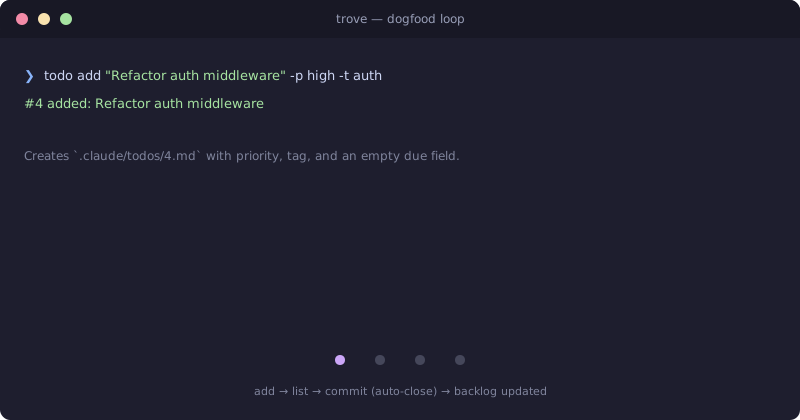
Full usage: todo SKILL, localize SKILL.
How it works (the interesting bits)
Backlog as markdown. Each task is .claude/todos/<N>.md. Plain text, hand-editable, git diff-friendly, commitable.
Auto-close on commit. Reference a task in your commit message and the post-commit git hook closes it:
git commit -m "Refactor middleware; closes #4"
→ #4 done: Refactor auth middleware
The closing commit hash is recorded in the task's frontmatter (closed_by_commit:) so the post-rewrite hook can reopen it if the commit gets rebased away.
Conflict-safe multi-machine sync. When two laptops both add a task while offline, they both create #11.md. On todo sync, git produces an add/add conflict — most tools punt. Trove auto-renumbers: keeps upstream's #11, renames the local one to the next free id (e.g. #12), updates the id: field, continues the rebase. You see renumbered: #11 -> #12 (conflicted with upstream). Tested in tests/sync-smoke.sh.
Sessions know your state. A SessionStart hook surfaces:
- Current branch + uncommitted file count
- Last 3 commits
- Top 5 ready todos
So Claude gets full situational awareness at session start without you having to re-explain anything.
Install
# Windows
irm https://raw.githubusercontent.com/AdityaMunot/trove/master/bootstrap.ps1 | iex
# macOS / Linux
curl -fsSL https://raw.githubusercontent.com/AdityaMunot/trove/master/bootstrap.sh | bash
Bootstrap auto-detects a local clone and uses it as the source, so ./bootstrap.sh works for dev sync without re-cloning. Copy-only and idempotent. After install it prints the per-project setup commands.
bootstrap.ps1 is a thin trampoline — it shells out to bash bootstrap.sh, so the install logic lives in one place. Windows users need Git Bash on PATH (Git for Windows installs it by default).
Uninstall
curl -fsSL .../bootstrap.sh | bash -s -- uninstall          # remote
./bootstrap.sh uninstall [--dry-run]                        # local
Reverses what bootstrap copied. Does not touch state outside the plugin's domain — .git/hooks/post-commit per project, .claude/{memory,todos}/ symlinks (run localize <kind> cleanup first if you want those gone), or your actual .claude/todos/*.md files.
Marketplace structure
The repo is laid out as a Claude Code plugin marketplace (.claude-plugin/marketplace.json + plugins/<name>/.claude-plugin/plugin.json), so you can also install via /plugin marketplace add <path-to-local-clone> from inside Claude Code. Not currently submitted to any public marketplace.