
Ferramenta de Pesquisa de Notícias com Langchain
adiiityasiingh/Research-Tool-Langchain
Análise de notícias financeiras com RAG multi-LLM e persistência de conhecimento
Ver no GitHubPlugin que integra múltiplos provedores de LLM (OpenAI, Claude, Gemini, Ollama) para análise de artigos de notícias e pesquisa financeira. Permite carregar URLs, processar conteúdo com RAG (Retrieval-Augmented Generation) via ChromaDB e fazer perguntas específicas sobre o material indexado.
Instalação
npx convez-ai adiiityasiingh/Research-Tool-Langchain1 comando no terminal: detecta o formato do repositório (marketplace ou plugin avulso) e instala via Claude Code. Requer Node 18+ e o Claude Code instalado.
Métricas
Casos de uso
- Pesquisa de notícias do mercado financeiro com QA contextual
- Análise comparativa de múltiplos artigos sobre um mesmo tema
- Extração de insights de conteúdo web sem dependência de API única
Veredito

Solução robusta e modular para RAG em domínio financeiro, com suporte a múltiplos provedores e persistência local. A arquitetura é bem pensada, mas requer configuração manual de APIs e é mais adequada para usuários técnicos que precisam de análise profunda de notícias.
README
A tradução para o português deste README ainda está na fila.
News Research Tool 📈
This is a powerful, user-friendly news research tool designed for effortless information retrieval and analysis. Users can input article URLs and ask questions to receive relevant insights from news articles and web content.
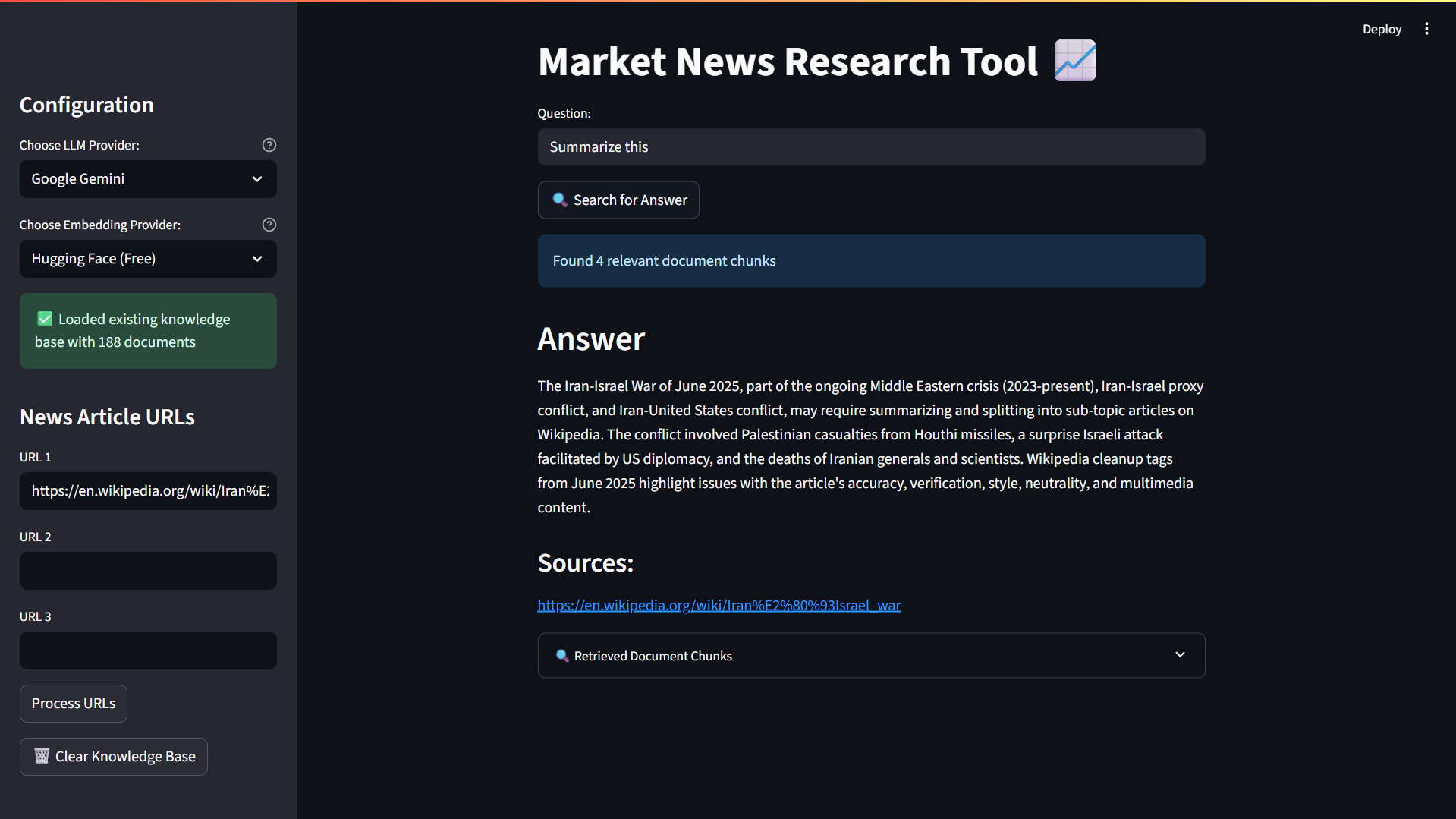
✨ Features
🔧 Multiple LLM Providers
- OpenAI GPT - Fast and reliable responses
- Anthropic Claude - Advanced reasoning capabilities
- Google Gemini - Powerful multimodal understanding
- Ollama (Local) - Run models locally for privacy
- Local HuggingFace - Offline model support
🧠 Flexible Embedding Options
- HuggingFace Embeddings - Free, high-quality embeddings
- OpenAI Embeddings - Premium embeddings with fallback support
- Automatic fallback between providers
📊 Advanced Vector Storage
- ChromaDB - Modern, efficient vector database
- Persistent storage across sessions
- Automatic knowledge base management
- Document chunking and indexing
🔍 Smart Content Processing
- WebBaseLoader - Robust web content extraction
- RecursiveCharacterTextSplitter - Intelligent text chunking
- Support for multiple URL processing
- Automatic content validation
🎯 Enhanced User Experience
- Real-time processing feedback with loading spinners
- Knowledge base persistence - no need to reprocess URLs
- Clear error messages and helpful guidance
- Debug information for troubleshooting
- Source attribution for answers
🛠️ Developer Friendly
- Environment-based configuration (.env support)
- Comprehensive error handling
- Deployment-ready with compatibility checks
- Modular architecture for easy customization
🚀 Installation
1. Clone the Repository
git clone https://github.com/adiiityasiingh/Research-Tool-Langchain.git
cd Research-Tool-Langchain
2. Install Dependencies
pip install -r requirements.txt
3. Environment Setup
Create a .env file in the project root with your API keys:
# Required for OpenAI
OPENAI_API_KEY=your_openai_api_key_here

# Optional - for Anthropic Claude
ANTHROPIC_API_KEY=your_anthropic_api_key_here

# Optional - for Google Gemini
GOOGLE_API_KEY=your_google_api_key_here
🎮 Usage
1. Start the Application
streamlit run main.py
2. Configure Your Setup
- Select LLM Provider: Choose from OpenAI, Claude, Gemini, Ollama, or Local HuggingFace
- Choose Embeddings: Pick between HuggingFace (free) or OpenAI embeddings
- Add URLs: Input up to 3 news article URLs in the sidebar
3. Process Content
- Click "Process URLs" to load and index the articles
- Watch real-time progress indicators
- Verify document count in the success message
4. Ask Questions
- Type your question in the main interface
- Click "🔍 Search for Answer"
- View the answer with source attribution
- Expand "Retrieved Document Chunks" for debugging
5. Manage Knowledge Base
- Clear Knowledge Base: Use the trash button to reset
- Add More URLs: Process additional articles to expand knowledge
- Persistent Storage: Your knowledge base persists between sessions
🔧 Configuration Options
LLM Providers
| Provider | Requirements | Best For |
|---|---|---|
| OpenAI | API Key | General use, fast responses |
| Claude | API Key | Complex reasoning, analysis |
| Gemini | API Key | Multimodal content |
| Ollama | Local install | Privacy, offline use |
| HuggingFace | Local models | Custom models, offline |
Embedding Providers
| Provider | Cost | Quality | Speed |
|---|---|---|---|
| HuggingFace | Free | High | Fast |
| OpenAI | Paid | Very High | Very Fast |
🚀 Deployment
Streamlit Cloud
- Push your code to GitHub
- Connect your repository to Streamlit Cloud
- Set environment variables in the Streamlit Cloud dashboard
- Deploy!
Platform Considerations
- SQLite Version: Requires SQLite ≥ 3.35.0 for ChromaDB
- Memory: Local models require additional RAM
- API Limits: Monitor usage for paid providers
Recommended Platforms
- ✅ Railway - Modern SQLite, easy deployment
- ✅ Render - Good compatibility, free tier
- ✅ Heroku - Reliable, paid service
- ⚠️ Streamlit Cloud - May have SQLite limitations
📁 Project Structure
Research-Tool-Langchain/
├── main.py                 # Main Streamlit application
├── requirements.txt        # Python dependencies
├── README.md              # This file
├── .env                   # Environment variables (create this)
├── .gitignore            # Git ignore rules
├── chroma_db/            # ChromaDB storage (auto-created)
│   └── ...               # Vector database files
└── rockybot.jpg          # App logo
🛠️ Troubleshooting
Common Issues
"SQLite version too old"
- Deploy to a platform with SQLite ≥ 3.35.0
- Consider Railway, Render, or Heroku
"No working embeddings provider found"
- Check your API keys in
.env - Try switching between embedding providers
"I don't know" responses
- Check the "Retrieved Document Chunks" section
- Verify URLs are accessible and contain text
- Try rephrasing your question
Local model issues
- Install required packages:
pip install torch transformers sentence-transformers - Ensure sufficient disk space for model downloads
Error Messages
- Red error messages: Critical issues requiring immediate attention
- Yellow warnings: Issues that may affect functionality
- Blue info messages: Helpful guidance and status updates
🔄 Recent Updates
- ✅ Multiple LLM Support - Added Claude, Gemini, Ollama, and local models
- ✅ ChromaDB Integration - Replaced FAISS with modern vector database
- ✅ Enhanced Error Handling - Better user feedback and debugging
- ✅ Persistent Storage - Knowledge base persists between sessions
- ✅ Deployment Optimizations - Better compatibility and fallbacks
- ✅ Improved UX - Loading spinners, progress indicators, and clear messaging
🤝 Contributing
- Fork the repository
- Create a feature branch
- Make your changes
- Test thoroughly
- Submit a pull request
📄 License
This project is licensed under the MIT License - see the LICENSE file for details.
🙏 Acknowledgments
- LangChain for the powerful framework
- Streamlit for the web interface
- ChromaDB for vector storage
- HuggingFace for open-source models and embeddings