
Aeon - Framework de Agentes Autônomos
aaronjmars/aeon
Framework autônomo com 197 skills. Configure uma vez, esqueça para sempre.
Ver no GitHubFramework TypeScript para criar agentes IA altamente autônomos que executam tarefas complexas sem intervenção manual. Oferece 197 skills pré-integradas (pesquisa, review de código, monitoramento, deploys) com configuração única e execução contínua via GitHub Actions.
Instalação
npx convez-ai aaronjmars/aeon1 comando no terminal: detecta o formato do repositório (marketplace ou plugin avulso) e instala via Claude Code. Requer Node 18+ e o Claude Code instalado.
Métricas
Casos de uso
- Automação de workflows de desenvolvimento (PRs, deploys, testes)
- Monitoramento contínuo e alertas inteligentes
- Pesquisa profunda automatizada e análise de dados
- Integração com Telegram, Discord e Slack para notificações
Veredito

Aeon é um framework robusto para agentes autônomos em produção, ideal para quem precisa eliminar approval loops e tarefas repetitivas. Exige Node.js 20+ e GitHub CLI, mas oferece valor real com 197 skills prontos e integração nativa com plataformas de comunicação.
README
A tradução para o português deste README ainda está na fila.
Quick start
You need three things:
-
Node.js 20+ — grab the LTS installer from nodejs.org, or use a package manager:
brew install node(macOS),winget install OpenJS.NodeJS.LTS(Windows), nvm or your distro's package manager (Linux). Already have it?node -vshould print 20 or higher. -
GitHub CLI (
gh), authenticated — the dashboard uses it for everything (secrets, workflows), and./aeonchecks it before starting. Install:brew install gh(macOS),winget install --id GitHub.cli(Windows), per-distro instructions (Linux). Then rungh auth loginand follow the prompts. -
Your own copy of this repo — click Use this template at the top of the repo page — keep it public, Actions minutes are free on public repos. CLI version:
gh repo fork aaronjmars/aeon --clone.
git clone https://github.com/<you>/aeon   # skip if you used `gh repo fork --clone`
cd aeon && ./aeon
Open http://localhost:5555 and follow the four steps:
- Authenticate — connect your Claude Pro/Max subscription, or paste an API key: Anthropic, Anthropic-compatible, or a gateway key (Bankr, OpenRouter, UsePod, Venice, Surplus) — routed automatically.
- Add a channel — Telegram, Discord, or Slack so Aeon can talk to you.
- Pick skills — toggle what you want, set schedules. Each skill shows the API keys and MCP servers it needs, with one-click setup.
- Run — hit Run now on any skill to try it immediately; API keys and
varvalues apply directly, no push needed. When you change config (schedules, toggles), Push commits it to GitHub in one click so Actions runs it on cron.
That's it — Aeon now runs unattended. On a public repo, GitHub Actions minutes are free. Run ./onboard anytime to verify your setup.
Grab the gh_*_macOS_arm64.zip (or your platform's binary) from github.com/cli/cli/releases and drop it on your PATH (e.g. ~/.local/bin). No installer, no sudo. Then gh auth login.
What Aeon can do

197 skills across 8 categories. Every skill is independently installable, schedulable, and chainable.
| Category | Count | Examples |
|---|---|---|
| 🧬 Core | 15 | skill-repair, autoresearch, spawn-instance, vuln-scanner |
| 📚 Research & Content | 28 | deep-research, paper-digest, hn-digest |
| 💻 Dev & Code | 37 | pr-review, github-monitor, auto-merge |
| 📈 Crypto & Markets | 29 | token-alert, defi-monitor, polymarket, base-mcp |
| 🛡️ Onchain Security | 15 | rug-scan, contract-audit, honeypot-check |
| ✍️ Social & Writing | 18 | write-tweet, thread-writer, reply-maker |
| ✅ Productivity | 19 | priority-brief, retrospective, goal-tracker |
| 🤖 Meta / Agent | 36 | heartbeat, cost-report, memory-flush |
| Category | Skills |
|---|---|
| Core (15) | autoresearch,contributor-reward,create-skill,deploy-prototype,distribute-tokens,external-feature,feature,fleet-control,fleet-scorecard,self-improve,skill-evals,skill-health,skill-repair,spawn-instance,vuln-scanner |
| Research & Content (28) | agent-displacement,article,article-queue,beat-tracker,channel-recap,competitor-radar,deep-research,digest,fetch-tweets,framework-watch,hn-digest,huggingface-trending,last30,launch-radar,list-digest,mcp-pulse,narrative-convergence,paper-digest,paper-pick,reddit-digest,research-brief,rss-digest,security-digest,technical-explainer,telegram-digest,topic-momentum,tweet-digest,vibecoding-digest |
| Dev & Code (37) | auto-merge,auto-workflow,builder-map,changelog,code-health,disclosure-tracker,ecosystem-entrants,ecosystem-links,ecosystem-pulse,fork-cohort,fork-fleet,fork-release,github-issues,github-monitor,github-releases,github-trending,issue-triage,pr-merge,pr-review,pr-tracker,pr-triage,project-lens,push-recap,pvr-triage,pvr-watchlist,repo-actions,repo-article,repo-pulse,repo-revive,repo-scanner,search-skill,skill-triage,smithery-manifest,star-milestone,vercel-projects,vuln-tracker,workflow-audit |
| Crypto & Markets (29) | aixbt-pulse,base-mcp,compute-pulse,defi-monitor,defi-overview,fear-divergence,liquidpad-launch,market-context,monitor-kalshi,monitor-polymarket,monitor-runners,narrative-tracker,onchain-monitor,picks-tracker,pm-intel,pm-manipulation,pm-pulse,polymarket,polymarket-comments,price-alert,rwa-pulse,token-alert,token-movers,token-pick,token-report,treasury-info,unlock-monitor,wallet-digest,x402-monitor |
| Onchain Security (15) | approval-audit,contract-audit,deployer-trace,fund-flow,holder-concentration,honeypot-check,investigation-report,linked-wallets,lp-lock,rug-scan,tx-explain,vigil,vigil-revoke,wallet-profile,wallet-risk |
| Social & Writing (18) | agent-buzz,content-performance,create-campaign,engagement-act,farcaster-digest,mention-radar,product-hunt,refresh-x,remix-tweets,reply-maker,schedule-ads,show-hn,skill-spotlight,syndicate-article,thread-formatter,thread-writer,tweet-roundup,write-tweet |
| Productivity (19) | action-converter,routine,deal-flow,ops-recap,followup-patrol,goal-tracker,idea-capture,idea-pipeline,idea-validator,milestone-tracker,priority-brief,note-taking,reflect,reg-monitor,startup-idea,tool-builder,v4-readiness,retrospective,shiplog |
| Meta / Agent (36) | api-health,atrium-watch,batch-health,capabilities-map,capabilities-sweep,config-validator,contributor-spotlight,cost-report,skill-adoption,fleet-state,contributor-leaderboard,fork-firstrun,fork-health,fork-digest,skill-gap,heartbeat,janitor,memory-flush,memory-dedupe,onboard,operator-scorecard,frequency-guard,rss-feed,self-review,signal-verdict,skill-analytics,skill-enabler,skill-freshness,skill-graph,skill-leaderboard,skill-scan,skill-update,sparkleware-catalog,spend-monitor,star-momentum,update-gallery |
Full descriptions: skills.json — or run ./add-skill aaronjmars/aeon --list.
Dependency graph: docs/skill-graph.md — a visual map of how skills connect.
It heals itself
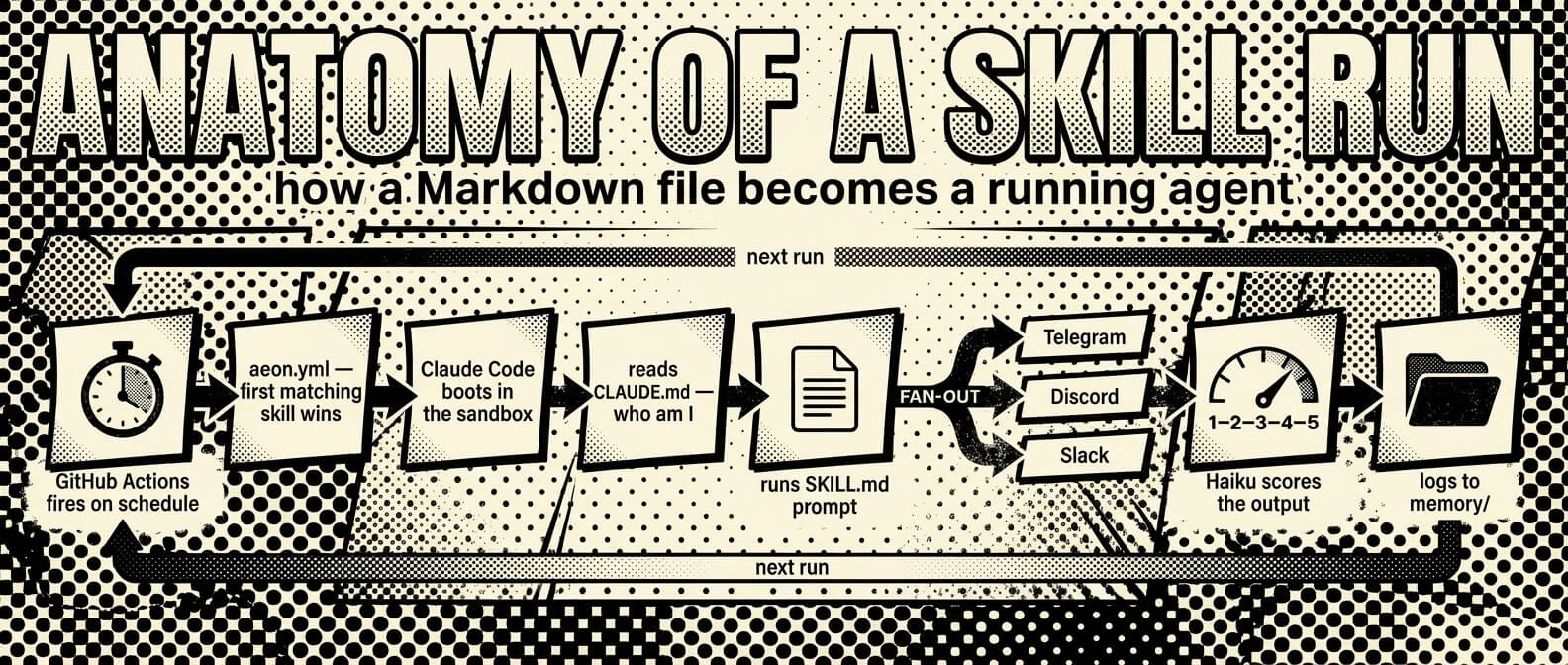
Every skill output is automatically scored 1–5 by Haiku after each run. Scores and failure flags (api_error, stale_data, rate_limited) are tracked per skill in memory/skill-health/ with a rolling 30-run history. When something breaks, the loop fixes it without you:
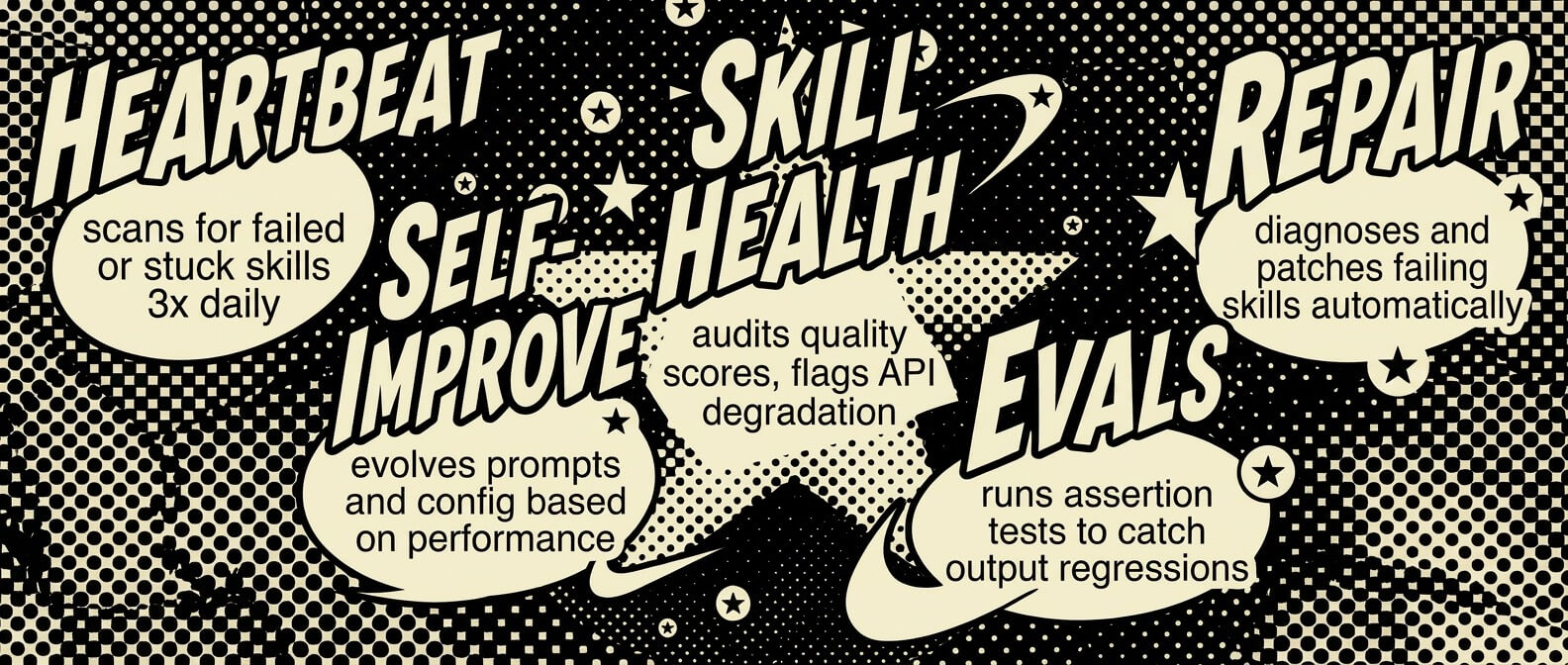
heartbeat(3x daily) — detects failed, stuck, or chronically broken skillsskill-health— audits quality scores and flags API degradation patternsskill-evals— assertion-based output tests to catch regressionsskill-repair— diagnoses and patches failing skills automaticallyself-improve— evolves prompts, config, and workflows based on performance
Health skills file issues, repair skills close them. heartbeat is the only skill enabled by default: nothing to report → silent; something needs attention → one notification. Deep dive: docs/CORE.md.
It replicates
Aeon can spawn and manage copies of itself. spawn-instance forks the repo into a new specialized instance (var: "crypto-tracker: monitor DeFi protocols"), selects relevant skills, and registers it in memory/instances.json — no secrets propagated, billing stays isolated. fleet-control health-checks and dispatches across instances; fleet-scorecard tracks fleet economics.
It ships real work
external-feature and feature ship code to watched repos unprompted. deploy-prototype generates and deploys live web apps to Vercel. vuln-scanner finds real vulnerabilities and discloses them responsibly. autoresearch evolves existing skills through scored variations, and create-skill generates new ones from a sentence.
Add more skills
./add-skill aaronjmars/aeon --list        # browse the built-in catalog
./add-skill BankrBot/skills bankr hydrex  # install from any GitHub repo
./add-skill BankrBot/skills --all         # install everything from a repo
./export-skill token-alert                # package one for standalone use
Installed skills land in skills/ and are added to aeon.yml disabled — flip enabled: true to activate. You can also:
- Build your own from
skill-templates/:./new-from-template <template> <skill-name> - Label any GitHub issue
ai-build— Claude reads the issue, implements it, and opens a PR - Install community packs — see Community skill packs
Why "the most autonomous"?
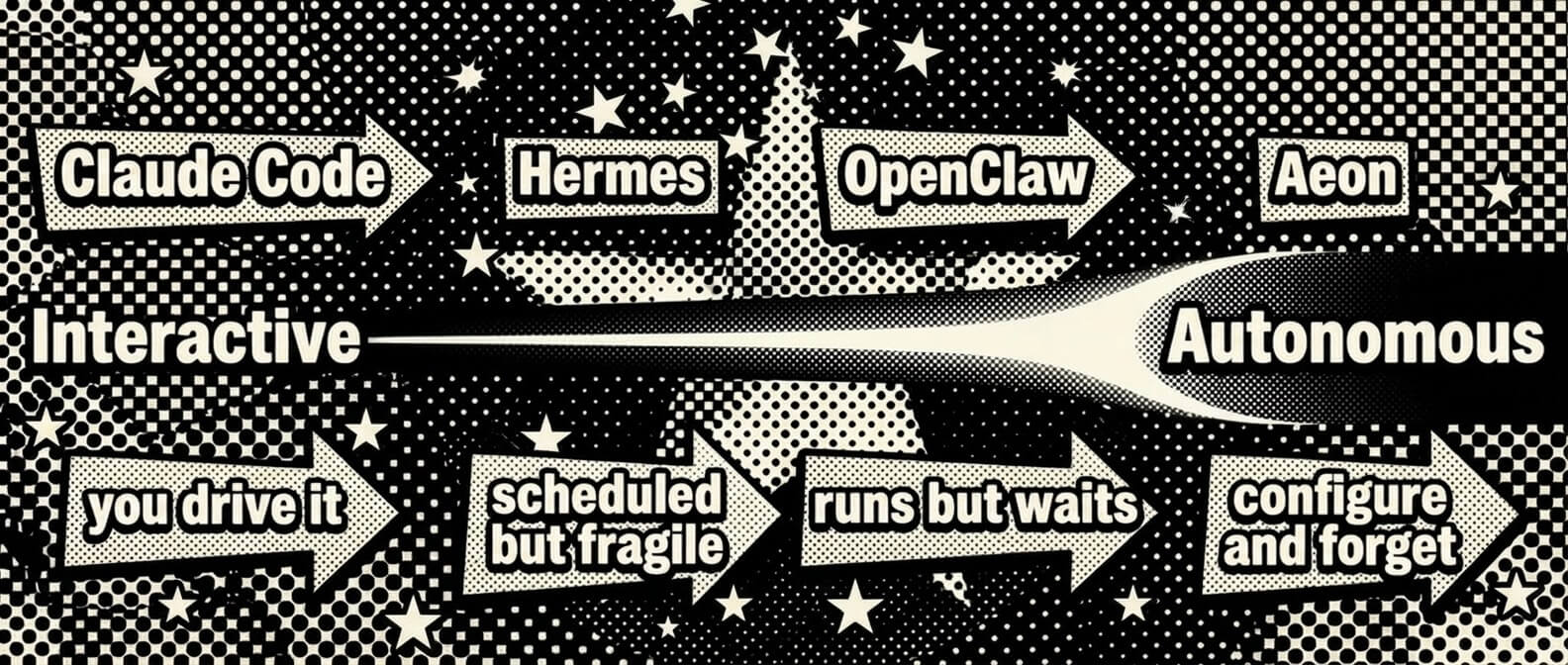
Most agent tools put you in the driver's seat — approve this tool call, review this diff, confirm this action. Aeon is built for the work you want done while you're not there: briefings, market monitoring, PR reviews, research digests, security scans.
| Aeon | Claude Code | Hermes | OpenClaw | |
|---|---|---|---|---|
| Runs unattended on a schedule | Yes | No | Yes | No |
| Self-heals when skills fail | Yes | No | No | No |
| Monitors its own output quality | Yes | No | No | No |
| Persistent memory across runs | Yes | No | Limited | No |
| Reactive triggers (auto-responds to conditions) | Yes | No | No | No |
| Fixes its own broken skills | Yes | No | No | No |
| Zero infrastructure | Yes (GitHub Actions) | Local | Self-hosted | Self-hosted |
| Reasons about tasks | Yes | Yes | Yes | Yes |
Other agents are interactive tools you use. Aeon is an autonomous system you configure and walk away from. It decides when to run, what to check, and when to bother you. You still want Claude Code for writing code interactively — but for the 90% of recurring tasks that don't need you in the loop, the most autonomous agent is the one that never asks.
For a comparison against the broader ecosystem (AutoGen, CrewAI, n8n, LangGraph) and active forks in production, see SHOWCASE.md. For products built on Aeon, see ECOSYSTEM.md.
Configure
Schedules
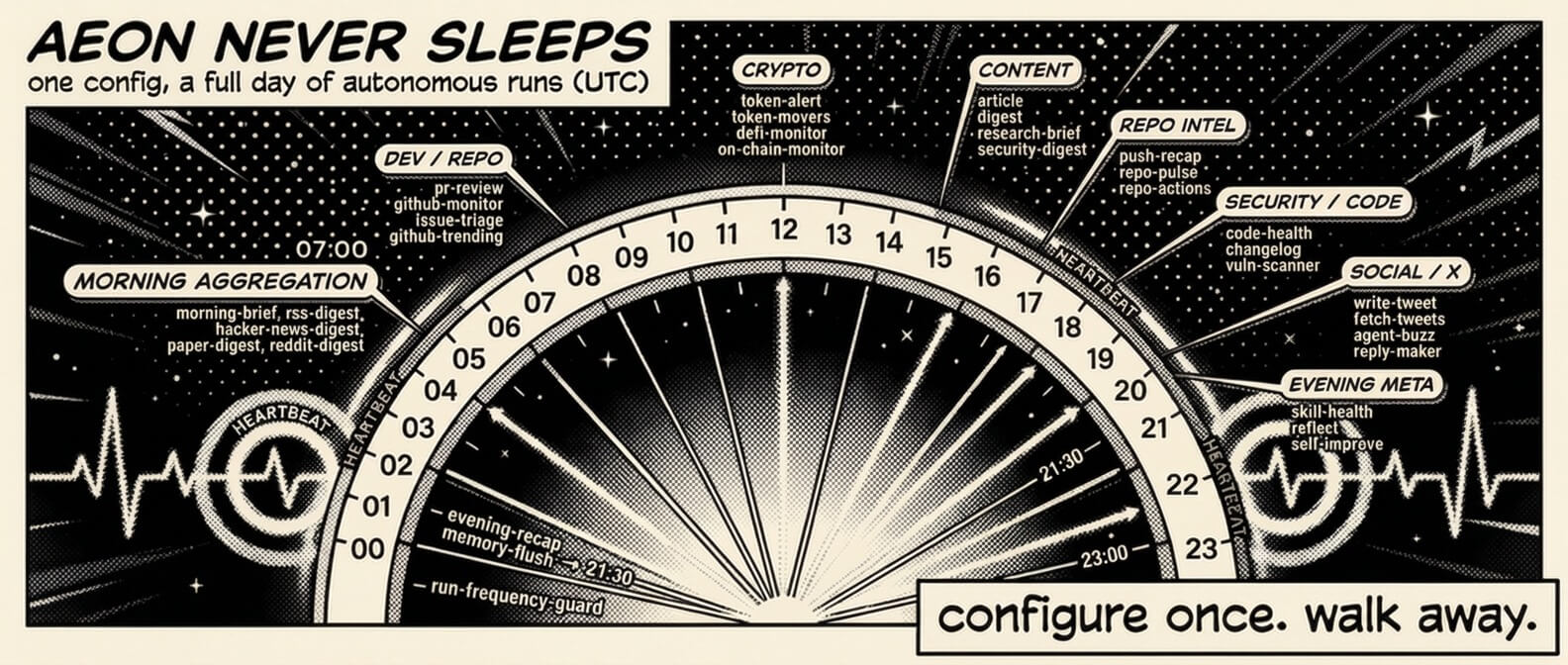
All scheduling lives in aeon.yml:
skills:
  article:
    enabled: true               # flip to activate
    schedule: "0 8 * * *"       # daily at 8am UTC
  digest:
    enabled: true
    schedule: "0 14 * * *"
    var: "solana"               # topic for this skill
Standard cron format, all times UTC. Supports *, */N, exact values, comma lists. Order matters — the scheduler picks the first matching skill, so put day-specific skills before daily ones and heartbeat last.
The var field
Every skill accepts a single var — a universal input each skill interprets its own way:
| Skill type | What var does | Example |
|---|---|---|
| Research & content | Sets the topic | var: "rust" → digest about Rust |
| Dev & code | Narrows to a repo | var: "owner/repo" → only review that repo's PRs |
| Crypto | Focuses on a token/wallet | var: "solana" → only check SOL price |
| Productivity | Sets the focus area | var: "shipping v2" → priority brief emphasizes v2 |
Empty var = the skill's default behavior (scan everything, auto-pick topics). Set it from the dashboard or pass it when triggering manually.
Models
The default model for all skills is set in aeon.yml (or from the dashboard header dropdown):
model: claude-opus-4-8
Options: claude-opus-4-8, claude-fable-5, claude-opus-4-7, claude-sonnet-4-6, claude-haiku-4-5-20251001. Per-run overrides are available via workflow dispatch, and individual skills can override to optimize cost:
skills:
  token-report: { enabled: true, schedule: "30 12 * * *", model: "claude-sonnet-4-6" }
Authentication
Set one of these — not both:
| Secret | What it is | Billing |
|---|---|---|
CLAUDE_CODE_OAUTH_TOKEN | OAuth token from your Claude Pro/Max subscription | Included in plan |
ANTHROPIC_API_KEY | API key from console.anthropic.com | Pay per token |
claude setup-token # opens browser → prints sk-ant-oat01-... (valid 1 year)
The dashboard's Authenticate modal handles both — and routes gateway keys (Bankr bk_…, OpenRouter sk-or-…, Surplus inf_…, or Venice/UsePod via the dropdown) automatically (see LLM Gateways).
Notifications
Set the secret → channel activates. No code changes needed.
| Channel | Outbound | Inbound |
|---|---|---|
| Telegram | TELEGRAM_BOT_TOKEN + TELEGRAM_CHAT_ID | Same |
| Discord | DISCORD_WEBHOOK_URL | DISCORD_BOT_TOKEN + DISCORD_CHANNEL_ID |
| Slack | SLACK_WEBHOOK_URL | SLACK_BOT_TOKEN + SLACK_CHANNEL_ID |
SENDGRID_API_KEY + NOTIFY_EMAIL_TO | — |
Telegram: Create a bot with @BotFather → get token + chat ID.
Discord: Outbound: Channel → Integrations → Webhooks → Create. Inbound: discord.com/developers → bot → add channels:history scope → copy token + channel ID.
Slack: api.slack.com → Create App → Incoming Webhooks → install → copy URL. Inbound: add channels:history, reactions:write scopes → copy bot token + channel ID.
Email: sendgrid.com/settings/api_keys → Create API Key (Mail Send permission) → add as SENDGRID_API_KEY, set NOTIFY_EMAIL_TO. Optional repo variables: NOTIFY_EMAIL_FROM (default aeon@notifications.aeon.bot), NOTIFY_EMAIL_SUBJECT_PREFIX (default [Aeon]).
Want ~1s Telegram replies instead of up-to-5-min polling? See Telegram instant mode.
API keys per skill
Skills that call third-party APIs declare their credentials in a requires: frontmatter list, so the dashboard shows which skill needs which key:
requires: [XAI_API_KEY, COINGECKO_API_KEY?] # bare = required · `?` = works better with
The dashboard surfaces this as an API keys panel on each skill (set/unset status, inline "Set" button), a ⚠ flag when an enabled skill is missing a required key, and a "used by" index under each key in Settings → Access Keys. Skills can likewise declare MCP servers with an mcp: list (mcp: [base]) — same two tiers, shown as a per-skill MCP servers panel with install state. Convention details: skill-templates/TEMPLATE.md.
Advanced
Everything below is optional — Aeon runs fine without any of it.
Skill chaining
Chain skills so outputs flow between them. Chains run as separate GitHub Actions workflow steps via chain-runner.yml:
chains:
  brief-pipeline:
    schedule: "0 7 * * *"
    on_error: fail-fast       # or: continue
    steps:
      - parallel: [token-movers, hn-digest]  # run concurrently
      - skill: priority-brief                          # runs after parallel group
        consume: [token-movers, hn-digest]   # gets their outputs injected
Each step runs as a separate workflow dispatch; outputs are saved to .outputs/{skill}.md and injected into downstream steps that consume: them. fail-fast aborts on any failure, continue keeps going.
Reactive triggers
Skills with schedule: "reactive" fire on conditions, not cron. The scheduler evaluates triggers after processing cron skills:
reactive:
  skill-repair:
    trigger:
      - { on: "*", when: "consecutive_failures >= 3" }
Scheduler frequency
Edit .github/workflows/messages.yml:
schedule:
  - cron: '*/5 * * * *'    # every 5 min (default)
  - cron: '*/15 * * * *'   # every 15 min (saves Actions minutes)
  - cron: '0 * * * *'      # hourly (most conservative)
Claude only installs and runs when a skill actually matches — non-matching ticks cost ~10s.
MCP servers in skill runs
Let skills call MCP servers (GitHub, a database, a paid API, your own) while they run in GitHub Actions. Opt-in and safe — with no .mcp.json at the repo root, runs are byte-identical to before.
cp .mcp.json.example .mcp.json # then edit, commit, push
The example ships two working servers — github (uses the runner's built-in GITHUB_TOKEN) and sequential-thinking (no-auth stdio). On the next run, the runner loads .mcp.json and auto-allows every server's tools, so a skill can just say "use the github MCP server to …".
Or skip the file entirely: the dashboard's MCP tab writes .mcp.json for you, lists Featured servers (e.g. Base) for one-click install, and tells you which secret each server needs.
Servers that need a secret — reference it with ${VAR}, never commit the value:
"acme": {
  "type": "http",
  "url": "https://mcp.acme.dev/v1",
  "headers": { "Authorization": "Bearer ${ACME_API_KEY}" }
}
Then just set the secret (dashboard MCP tab inline, Settings → Add Credential, or gh secret set ACME_API_KEY) — the runner auto-resolves any ${VAR} your .mcp.json references from the repo's secrets, with zero workflow editing. If a referenced secret isn't set, the runner skips MCP for that run and logs a warning instead of breaking the skill.
Notes: scope is global (.mcp.json applies to every skill); add "alwaysLoad": true to force a server's tools into context every run; stdio servers run as local processes in the runner, HTTP/SSE servers are reached over the network.
Use Aeon's skills from Claude or any agent (MCP & A2A)
Aeon skills work outside GitHub Actions too — locally via claude -p -, identical to Actions. API keys are read from your environment or a .env file in the repo root.
Claude (MCP) — every skill appears as an aeon-<name> tool in Claude Desktop and Claude Code:
./add-mcp                    # build and register
./add-mcp --desktop          # also print Claude Desktop config
./add-mcp --uninstall        # remove
Any AI agent (A2A) — Google's A2A protocol lets LangChain, AutoGen, CrewAI, OpenAI Agents SDK, and Vertex AI invoke skills via HTTP:
./add-a2a                    # starts on port 41241
./add-a2a --print-config     # LangChain/Python client examples
Working client scripts for every supported stack (LangChain, AutoGen, CrewAI, OpenAI Agents SDK, MCP stdio, Claude Desktop) live in examples/ — each <100 lines, calling a real skill end-to-end. Start with examples/README.md.
Cross-repo access
The built-in GITHUB_TOKEN is scoped to this repo only. For github-monitor, pr-review, issue-triage, and external-feature to work on your other repos, add a GH_GLOBAL personal access token: github.com/settings/tokens → Fine-grained → set repo access → grant Contents, Pull requests, Issues (read/write) → add as GH_GLOBAL secret. Skills use it when available and fall back to GITHUB_TOKEN automatically.
LLM Gateways
Aeon can power Claude Code seven ways. Two are direct to Anthropic; the other five route through a gateway. You add a credential in the dashboard's Authenticate modal — paste it and the provider is detected from its prefix (or picked from the dropdown) and saved as the secret below.
Routing is automatic. aeon.yml ships gateway: { provider: auto }, and each run resolves the live provider from whichever secrets are set, in priority order — so adding or removing a key changes routing with no re-config:
claude (CLAUDE_CODE_OAUTH_TOKEN) → anthropic (ANTHROPIC_API_KEY) →
openrouter → bankr → usepod → venice → surplus → direct (fallback)
It runs as a cascade: the highest-priority provider whose key is set goes first, and on any failure (no credits, rate limit, outage, dud response) the run automatically falls over to the next provider whose key is set — so a dead provider degrades gracefully instead of failing the run, and it only errors out if every provider fails. The log prints Routing attempt via '<provider>' per hop (and ran via fallback provider … when it recovers).
Override the order with the repo variable GATEWAY_ORDER (space-separated names), or pin a single provider (which disables failover) by setting gateway.provider to direct/bankr/openrouter/usepod/venice/surplus explicitly.
Direct (provider: direct) — the official Anthropic API, no middleman:
| Mode | Credential | Notes |
|---|---|---|
| Claude subscription | CLAUDE_CODE_OAUTH_TOKEN | Your Claude Pro/Max plan — Connect in the modal runs the OAuth flow; no per-token billing |
| Anthropic API | ANTHROPIC_API_KEY | Pay-as-you-go API key (or any Anthropic-compatible endpoint via ANTHROPIC_BASE_URL) |
Gateways — route Claude through an alternative provider (cheaper Opus, crypto-settled, privacy-first…). Keys with a distinctive prefix are detected automatically; UsePod and Venice have no prefix, so pick them in the dropdown:
| Gateway | Secret | Notes |
|---|---|---|
| Bankr | BANKR_LLM_KEY | Discounted Opus access |
| OpenRouter | OPENROUTER_API_KEY | Anthropic-native passthrough; lowest-risk option |
| UsePod | USEPOD_TOKEN | Solana marketplace; token is embedded in the base URL, keep it secret |
| Venice | VENICE_API_KEY | Privacy-first; OpenAI-compatible, bridged via a per-run claude-code-router sidecar |
| Surplus | SURPLUS_API_KEY | Routed via The Bridge; settles in USDC on Base — fund the wallet + approve() once before use |
Adding a gateway
A gateway is wired through five files, all following the existing pattern — so copy an entry of the same tier. There are two: native (the provider already speaks the Anthropic API — just point ANTHROPIC_BASE_URL at it, like Bankr/OpenRouter/UsePod) and sidecar (OpenAI-compatible — bridged per run by a claude-code-router sidecar, like Venice/Surplus).
apps/dashboard/lib/types.ts— add the slug to theGatewayProviderunion and theGATEWAY_PROVIDERSarray.apps/dashboard/lib/auth-provider.mjs— addslug: { label, secretName, prefixes }(emptyprefixes: []= dropdown-only, no auto-detect).apps/dashboard/app/api/secrets/route.ts— list the secret inBUILTIN_SECRETSand mapSECRET_NAME → sluginGATEWAY_SECRETSso the dashboard recognises it as a gateway key (and keepsaeon.ymlonauto).scripts/llm-gateway.sh— add acasebranch (a native provider exportsANTHROPIC_BASE_URL+ the auth token; a sidecar provider callsstart_ccr_sidecar <slug> <openai-url> <key> <model>), and add the slug + its secret to the auto-resolver's default order so it's picked up automatically..github/workflows/aeon.yml— pass the new secret (and any*_MODELoverride variables) into the run'senv:(alsomessages.yml), so the resolver can see it.
Then add a row to the gateway table above. To verify the full loop: paste a key in the dashboard (prefix should auto-detect, or pick it from the dropdown) and run any skill — the workflow log prints ::notice:: gateway=auto resolved to <slug> followed by ::notice:: Routing through ….
Soul
By default Aeon has no personality. To make it write and respond like you:
- Fork soul.md and fill in
SOUL.md(identity, worldview),STYLE.md(voice, vocabulary), andexamples/good-outputs.md(10–20 calibration samples) - Copy into your Aeon repo under
soul/ - Add an
## Identitysection at the top ofCLAUDE.mdtelling Aeon to read and embody them
Every skill reads CLAUDE.md, so identity propagates automatically. Quality check: soul files work when they're specific enough to be wrong. "I think most AI safety discourse is galaxy-brained cope" is useful; "I have nuanced views on AI safety" is not.
Publishing (GitHub Pages & RSS)
Aeon publishes articles to a GitHub Pages gallery and an RSS feed.
- Pages: Settings → Pages → source
Deploy from a branch, branchmain, folder/docs. The site lives athttps://<username>.github.io/aeon; theupdate-galleryskill keeps it in sync. - RSS: Subscribe at
https://raw.githubusercontent.com/<owner>/<repo>/main/articles/feed.xml— regenerated after each content skill runs.
Telegram instant mode
Replies aren't instant by default — Aeon runs on GitHub Actions and polls Telegram every 5 minutes. That's by design: it's built for autonomous background work, not real-time chat. For ~1-second replies, deploy the self-contained Cloudflare Worker in apps/webhook/ into your own Cloudflare account (no shared infra, no credential custody) — a one-time setup of about 5 minutes:
The deploy wizard prompts for the four variables (TELEGRAM_BOT_TOKEN, TELEGRAM_CHAT_ID, GITHUB_REPO, GITHUB_TOKEN) and stores them as encrypted Worker secrets, so the Worker comes out configured — then point your bot at it with setWebhook. The dashboard walks through all three steps with one-click webhook registration: Settings → Credentials → Telegram → ⚡ Instant replies. The button needs a public source repo — on a private fork, mirror apps/webhook/ to a small public repo and point the button URL there.
Full guide: apps/webhook/README.md. The poller detects an active webhook (getWebhookInfo) and skips Telegram polling automatically, so the two never conflict.
Remote dashboard access
The dashboard's /api/* routes drive gh workflow run and read/write repo secrets, so they're gated to loopback callers by default — no remote callers, no DNS-rebinding from a malicious page. To reach the dashboard from another machine or over a tunnel (Tailscale, ngrok, reverse proxy):
| Env var | Behaviour |
|---|---|
AEON_DASHBOARD_ALLOWED_HOSTS=aeon.local,box.tail-xxx.ts.net | Extends the loopback allowlist by hostnames (comma-separated, case- and port-insensitive) |
AEON_DASHBOARD_ALLOW_ANY_HOST=1 | Disables Host-header checking entirely. Only for a trusted reverse proxy that terminates Host upstream — loudly insecure otherwise |
The gate also rejects state-changing requests whose Origin isn't allowlisted, so a malicious page can't drive /api/secrets via a no-cors POST. Code: apps/dashboard/proxy.ts + apps/dashboard/lib/security/api-gate.ts.
Fleet Watcher (authorization layer)
Add inline ALLOW/BLOCK authorization in front of every skill run. Each workflow asks your self-hosted Fleet Watcher control plane "is this allowed?" before Claude starts and reports the outcome after. BLOCK = workflow exits non-zero, Claude never runs, audit ref recorded.
Already wired into .github/workflows/aeon.yml as two opt-in steps. To enable: stand up Fleet Watcher, mint a token via POST /api/aeon/register, and add two secrets — FLEET_ENDPOINT (base URL) and FLEET_TOKEN (the agnt_… token). Define your red lines (per-skill caps, counterparty allowlists, dangerous-string patterns) in its dashboard.
If the secrets aren't set, both steps no-op — fully backward compatible. If Fleet is unreachable when they are set, the preflight fails closed (skill doesn't run); the postflight always runs so blocked skills are still recorded.
Community skill packs
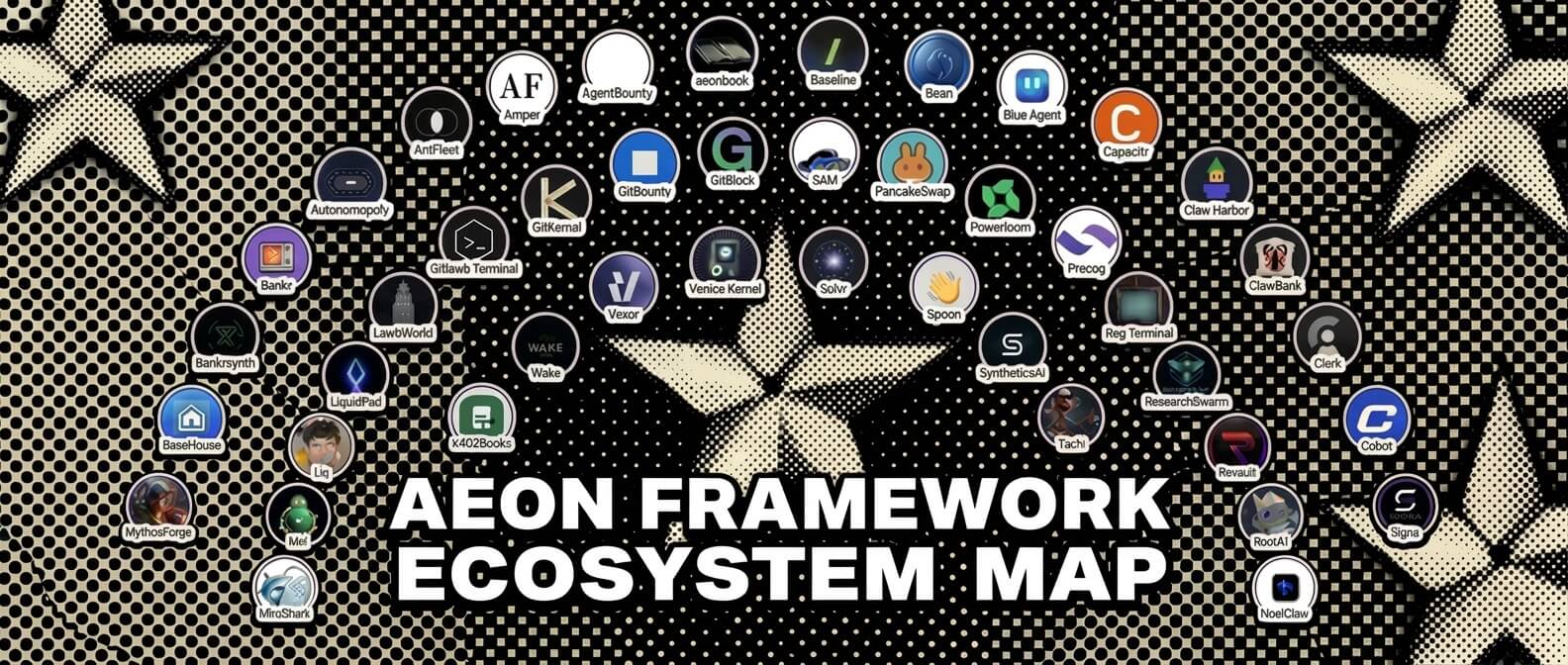
Third-party skill collections in their own repos, installable as one bundle:
./install-skill-pack baseddevoloper/aeon-skill-pack-vvvkernel
./install-skill-pack --list      # browse the registry (skill-packs.json)
The script reads the pack's skills-pack.json manifest, runs the security scanner on each SKILL.md, and copies approved skills into skills/ (disabled in aeon.yml, provenance in skills.lock). Full schema and trust model: docs/community-skill-packs.md.
| Pack | Skills | Description |
|---|---|---|
| aeon-skill-pack-vvvkernel | 9 | Venice AI inference via VVVKernel — onchain, audit, growth, narrative, image gen, monitoring |
| luca-aeon-skills | 4 | Financial intelligence via x402Books AI — wallet scanning, treasury monitoring, financial reports, and agent registry on Base |
| zer0-skill-pack | 6 | Polymarket intelligence — daily thesis, mispricing scanner, contrarian fades, narrative-vs-markets, paper-trade PnL journal, alpha comment curator |
| gitbounty-skill-pack | 1 | Bounty hunting on the gitlawb network via gitbounty — discover open bounties, scout the best fit with the gitbounty LLM scout, draft a solution plan (read-only) |
| aeon-skills | 2 | Two-model-consensus PR review (Opus 4.7 + GPT-5) — channel drawdown for installed repos, x402 pay-per-call for public repos |
| careful-finance-aeon-skill-pack | 1 | Careful Finance market intelligence — scan DeFi yield and perpetual-futures opportunities, then print or publish a conservative hourly snapshot |
| aeon-skill-pack-liquidpad | 4 | Track LiquidPad on Base — burn cycle alerts, new token launches with onchain provenance, daily protocol digest, and fee accrual tracking |
| aeon-skill-pack-mythosforge | 5 | Read-only MythosForge monitoring — ops/backlog/jury/payout health, proof-of-creation integrity on Base, theme/round guard against silent relabels, jury-drift detection, and live gallery/proof-page QA |
| demo-pack | 1 | Holographic demo skill — proves the Sparkleware registry install pipeline works |
| aeon-pulse | 1 | Daily activity summary for the Aeon framework — recent commits, releases, and open issues |
| registry-watch | 1 | Daily digest of new packs added to the Sparkleware registry — discover community skills without manually browsing |
| arxiv-digest | 1 | Daily digest of newest AI / autonomous-agent papers on arXiv — top submissions in cs.AI, cs.LG, cs.MA |
| hn-top | 1 | Daily digest of HackerNews top stories — dev / startup / AI conversation in one screen |
| eth-gas-watch | 1 | Ethereum gas-price status check on a schedule — flags cheap windows for batching on-chain ops |
| morning-briefing | 1 | Daily morning briefing — date, day-of-week, current weather, and a sparkly closer |
| aeon-skill-pack-noelclaw | 2 | Persistent versioned memory and multi-agent swarm coordination — save typed artifacts to Noel Vault and manage shared agent session state across runs |
signa (--path aeon-skills) | 20 | Full SIGNA suite — wallet-signed cross-platform agent messaging, multi-agent broadcast and delegate, encrypted rooms + ERC-8004 trust gate, plus Bankr resolver / launches, gitlawb, MiroShark, and x402 receipts + bounded spend mandates (a human grants a signed budget, the agent spends within it and asks for more) |
| aeon-skill-pack-mneme | 8 | Mneme as Aeon's persistent memory layer — vector recall across runs, entity/relation graph, live Base chain streams, async LLM "dream" reflections, and schema-aware /chat. One MNEME_API_KEY, zero infra. |
To list a pack here, open a PR adding a row. Guidelines:
- The pack must be in its own public repo with a clear license and a per-skill
SKILL.md. - Skills should follow the conventions in
add-skilland the core catalog — no monkey-patching of Aeon internals, no skill that depends on private endpoints. - Add a
skills-pack.jsonmanifest at the pack root soinstall-skill-packknows which skills the pack ships (see docs for the schema). - The README row should link to the repo, name the skill count, and one-line what the pack is for.
- In the same PR, add a matching entry to
skill-packs.json— the machine-readable mirror of this table (registry schema in the docs).
Two-repo strategy
This repo is a public template. Run your own instance as a private fork so memory, articles, and API keys stay private:
git remote add upstream https://github.com/aaronjmars/aeon.git
git fetch upstream
git merge upstream/main --no-edit
Your memory/, articles/, and personal config won't conflict — they're in files that don't exist in the template.
GitHub Actions cost
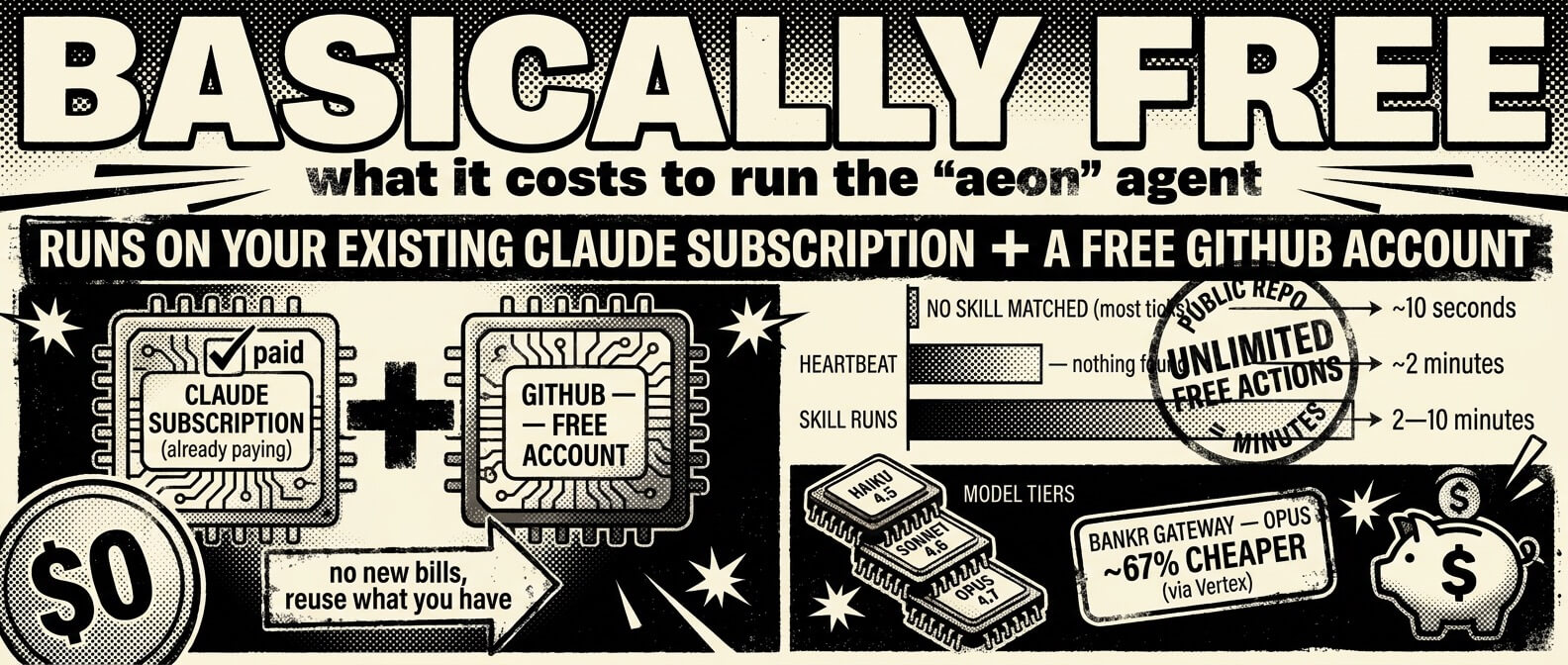
| Scenario | Cost |
|---|---|
| No skill matched (most ticks) | ~10s — checkout + bash + exit |
| Skill runs | 2–10 min depending on complexity |
| Heartbeat (nothing found) | ~2 min |
| Public repo | Unlimited free minutes |
Private repos: Free plan = 2,000 min/mo, Pro/Team = 3,000 + $0.008/min overage. To reduce usage: switch to */15 or hourly cron, disable unused skills, keep the repo public. Every run logs token usage to memory/token-usage.csv; the cost-report skill generates a cost breakdown by skill and model.
Project structure
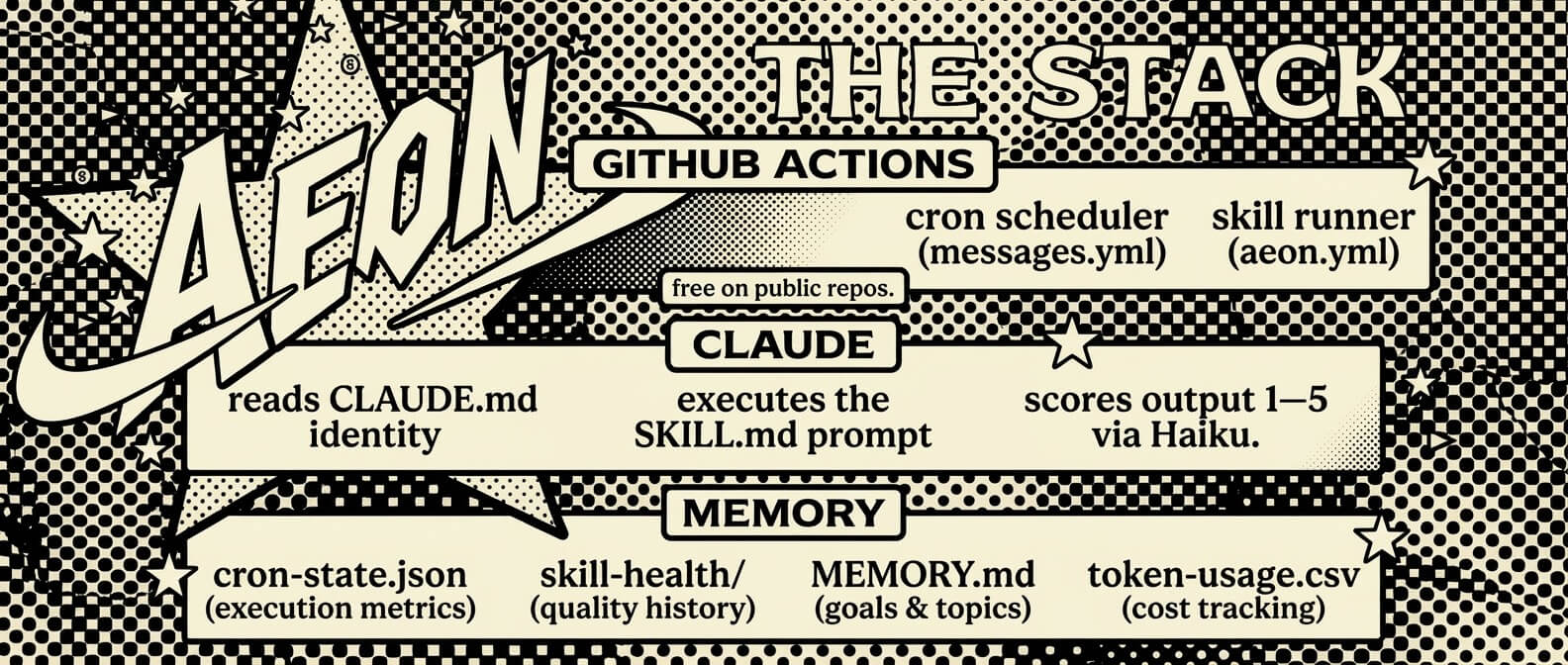
CLAUDE.md                ← agent identity (auto-loaded by Claude Code)
aeon.yml                 ← skill schedules, chains, reactive triggers, enabled flags
skills.json              ← machine-readable skill catalog (197 skills)
./aeon                   ← launch the local dashboard (Next.js on port 5555)
./onboard                ← validate the fork's setup (secrets, workflows, channels)
./notify                 ← multi-channel notifications (Telegram, Discord, Slack, Email, json-render)
./notify-jsonrender      ← convert skill output to dashboard feed cards via Haiku
./add-skill              ← import skills from GitHub repos (with security scanning)
./add-mcp                ← register Aeon as an MCP server for Claude Desktop/Code
./add-a2a                ← start the A2A protocol gateway for external agents
./export-skill           ← package skills for standalone distribution
./generate-skills-json   ← regenerate skills.json from SKILL.md files
docs/                    ← GitHub Pages site (articles, activity log, memory)
soul/                    ← optional identity files (SOUL.md, STYLE.md, examples/, data/)
skills/                  ← each skill is a SKILL.md prompt file (197 total)
workflow-templates/      ← GitHub Agentic Workflow templates (.md)
skill-templates/         ← templates for building your own skills
apps/                    ← standalone sub-projects, each with its own package.json
  dashboard/             ← local web UI (Next.js + json-render feed)
  mcp-server/            ← MCP server — exposes skills as Claude tools
  a2a-server/            ← A2A protocol gateway — exposes skills to any agent framework
  webhook/               ← Telegram instant-mode Cloudflare Worker (~1s delivery)
memory/
  MEMORY.md              ← goals, active topics, pointers
  cron-state.json        ← per-skill execution metrics (status, success rate, quality)
  skill-health/          ← rolling quality scores per skill (last 30 runs)
  token-usage.csv        ← token cost tracking per run
  issues/                ← structured issue tracker for skill failures
  topics/                ← detailed notes by topic
  logs/                  ← daily activity logs (YYYY-MM-DD.md)
.outputs/                ← skill chain outputs (passed between chained steps)
scripts/
  prefetch-xai.sh        ← pre-fetch X/Grok API data outside sandbox
  postprocess-replicate.sh ← generate images via Replicate after Claude runs
  skill-runs             ← audit recent GitHub Actions skill runs
  sync-site-data.sh      ← sync memory/logs to docs site data
.github/workflows/
  aeon.yml               ← skill runner (workflow_dispatch, issues, quality scoring)
  chain-runner.yml       ← skill chain executor (parallel + sequential pipelines)
  messages.yml           ← cron scheduler + message polling (Telegram/Discord/Slack)
FAQ
What is Aeon?
Aeon is an AI agent system that runs unattended on GitHub Actions, self-heals when skills fail, and monitors its own output quality. Configure once, walk away — it handles recurring tasks like briefings, market monitoring, PR reviews, and research digests.
Can I create custom skills?
Yes. Bootstrap from skill-templates/ (./new-from-template <template> <skill-name> --var KEY=VALUE...), describe one to the create-skill skill, or label a GitHub issue ai-build and let Aeon build it.
Troubleshooting
- Dashboard not loading — make sure
./aeonis running and checkhttp://localhost:5555. - Skills not executing — run
./onboard --remoteto verify setup, check GitHub Actions workflow status. - Notifications not working — verify channel secrets in the dashboard (Telegram/Discord/Slack tokens).
- Self-healing not working — enable
skill-repairandskill-health, checkmemory/state.
Need more help?
Check the docs/ directory, run ./onboard for setup verification, or open an issue on GitHub.
Star History
Support the project : 0xbf8e8f0e8866a7052f948c16508644347c57aba3