
MCP Man
aaglexx/mcp-man
Postman para MCP: inspecione, teste e explore servidores MCP em tempo real
Ver no GitHubFerramenta de inspeção e teste para servidores MCP. Permite explorar 156+ servidores, visualizar schemas de ferramentas, testar chamadas em tempo real e configurar autenticação para múltiplos serviços — tudo via interface web ou CLI.
Instalação
npx convez-ai aaglexx/mcp-man1 comando no terminal: detecta o formato do repositório (marketplace ou plugin avulso) e instala via Claude Code. Requer Node 18+ e o Claude Code instalado.
Métricas
Casos de uso
- Inspecionar schemas e parâmetros de ferramentas MCP sem consultar repositórios
- Testar chamadas de API para servidores MCP antes de integrar em aplicações
- Descobrir e explorar novos servidores MCP através de registro centralizado
- Configurar autenticação guiada para servidores que exigem tokens/credenciais
Veredito

Ferramenta essencial para desenvolvimento com MCP. Reduz fricção ao trabalhar com múltiplos servidores eliminando necessidade de revisar documentação dispersa. Interface web intuitiva e CLI robusto cobrem fluxos de descoberta e teste.
README
A tradução para o português deste README ainda está na fila.



mcp-man
Postman for MCP. Search 156 servers, inspect their tools, test them live — all from the browser.
npm install -g @aaglexx/mcp-man
mcp-man ui
The problem
There are hundreds of MCP servers. But to know what any of them actually does, you have to dig through GitHub READMEs, guess at parameters, and figure out which env vars it needs. Every time.
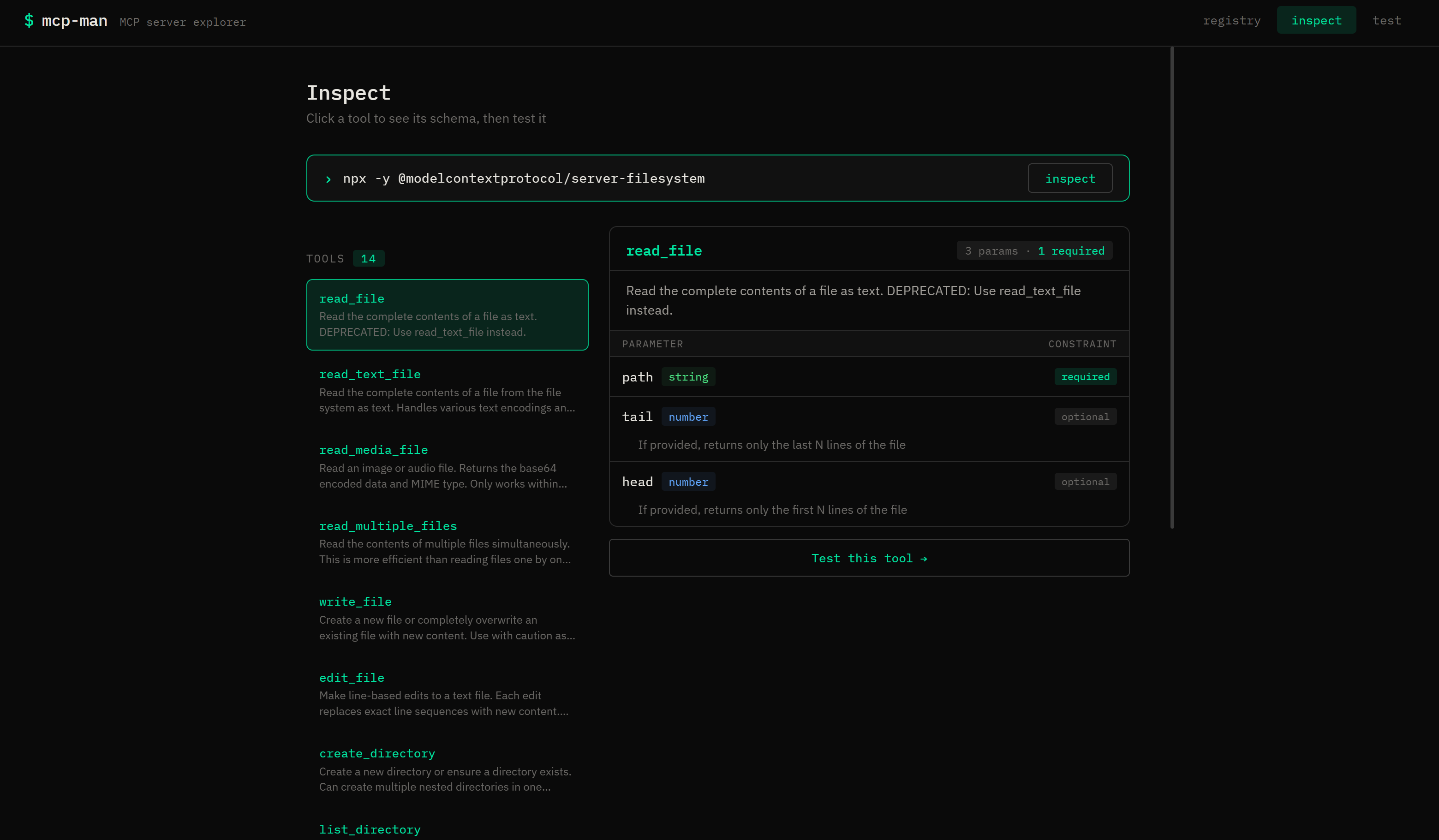
mcp-man fixes that. Connect to any MCP server and instantly see every tool, its full schema, required params, and types. Then call it with one click.
What's inside
| Registry | 156 servers, searchable by name or tag |
| Inspect | Connect to any server, browse tools with full schema visualizer |
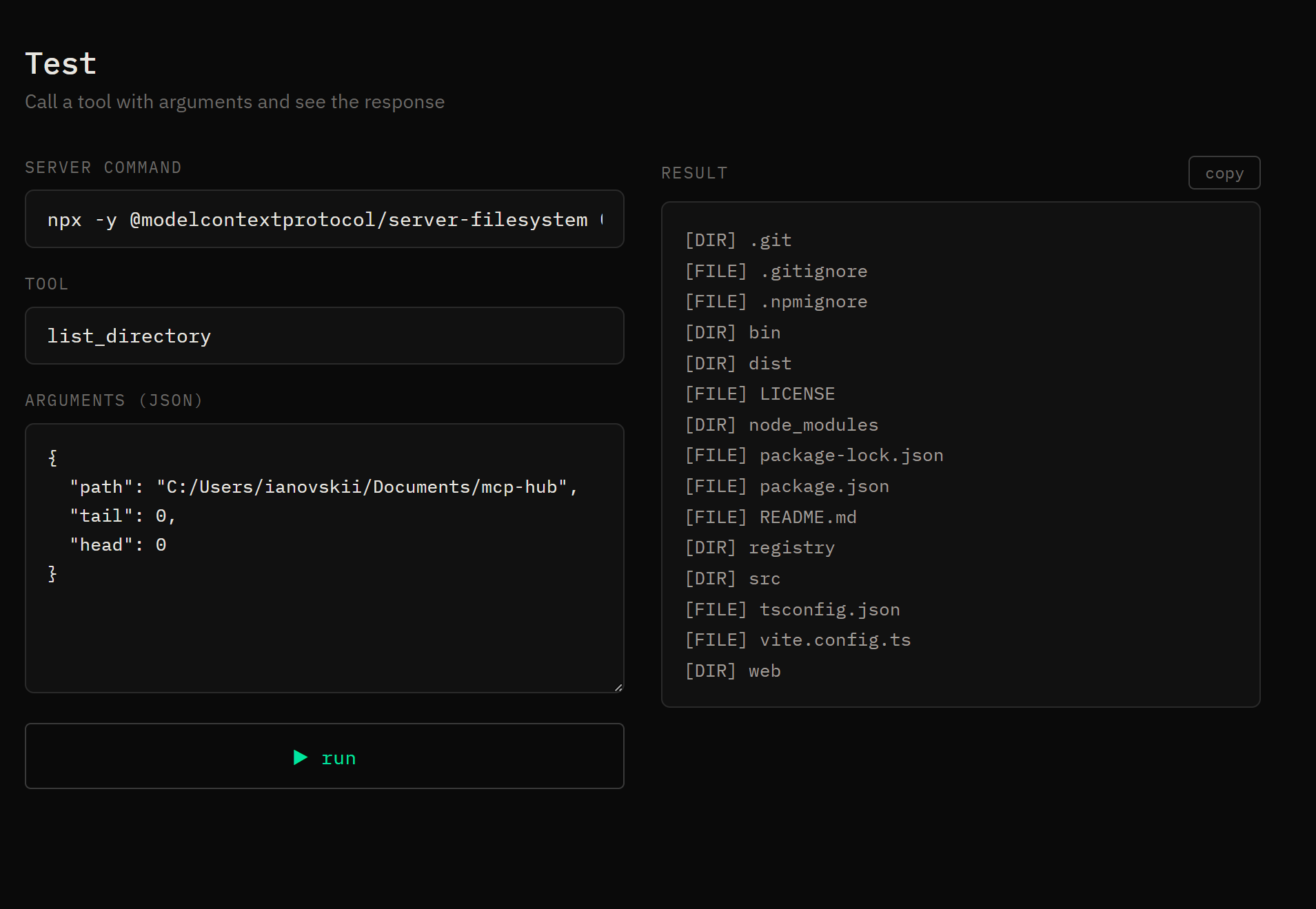
| Test | Call any tool live with JSON args, see the raw response |
| Auth wizard | Guided API key setup for 78 servers — with direct links to get each token |
| CLI | Everything available from the terminal too |
Get started
# No auth needed — works instantly
npx -y @modelcontextprotocol/server-memory
npx -y @modelcontextprotocol/server-filesystem /your/path

# Needs a token — wizard will guide you
github-mcp-server              → GITHUB_PERSONAL_ACCESS_TOKEN
@notionhq/notion-mcp-server    → Notion integration token
Just paste any command into the Inspect field and hit go.
CLI
mcp-man search github
mcp-man search --tag database
mcp-man inspect "npx -y @modelcontextprotocol/server-memory"
mcp-man test read_graph --server "npx -y @modelcontextprotocol/server-memory"
Add your server
Edit registry/servers.json and open a PR:
{
  "name": "@you/your-mcp-server",
  "description": "One line about what it does",
  "url": "https://github.com/you/your-server",
  "tags": ["your", "tags"],
  "author": "Your Name",
  "license": "MIT"
}
If your server needs credentials, add an env array — the auth wizard will pick it up automatically.
Dev setup
git clone https://github.com/aaglexx/mcp-man && cd mcp-man && npm install

# Terminal 1
npm run dev:cli -- ui --dev

# Terminal 2
npm run dev:web
Roadmap
- Registry with 156 servers
- Schema visualizer
- Auth wizard for 78 servers
- Sandboxed runner — no local install needed
- Health badge per server
MIT