
kongcode
42U/kongcode
Persistent cognitive architecture for Claude Code — graph memory with learned retrieval (98.2% R@5), automatic extraction of concepts, causal chains, skills, and corrections, emergent identity via soul graduation. SurrealDB + BGE-M3.
Instalação
npx convez-ai 42U/kongcode1 comando no terminal: detecta o formato do repositório (marketplace ou plugin avulso) e instala via Claude Code. Requer Node 18+ e o Claude Code instalado.
Métricas
README
A tradução para o português deste README ainda está na fila.
KongCode


Graph-backed permanent memory for Claude Code.
Quick start | Architecture | Configuration | Troubleshooting | Development
What it does
KongCode gives Claude Code a persistent, queryable memory that grows with every session. It extracts concepts, causal chains, corrections, preferences, decisions, and skills from conversations automatically — then retrieves them with a multi-stage pipeline (BGE-M3 vectors → learned ACAN scoring → cross-encoder reranking, 98.2% R@5) backed by a SurrealDB graph running locally. After enough sessions, the agent earns an emergent identity (soul graduation) grounded in its actual working history.
| Capability | Stock Claude Code | With KongCode |
|---|---|---|
| Memory | File-based, per-project, manual | Graph DB, cross-session, automatic |
| Context window | Sliding, lost on /clear or session end | Retrieval-augmented from prior turns and concepts |
| Knowledge extraction | None | Concepts, causal chains, monologues, corrections, preferences, artifacts, decisions, skills, reflections |
| Procedural memory | None | Skills mined from successful workflows, surfaced when preconditions match |
| Retrieval quality | None (no memory to retrieve) | Vector search → ACAN reranker → cross-encoder rerank → graph expansion (98.2% R@5 on LongMemEval) |
| Identity | Stateless on every turn | Earned soul after a graduation gate (volume + quality thresholds) |
Quick start
Install the plugin, set up the system prompt, and open a session. The daemon provisions SurrealDB, the embedding model, and everything else on first run.
Prerequisites
| Tool | When required |
|---|---|
| git | Always (Claude Code uses it to clone the marketplace repo) |
| Node.js >= 18 + npm | Only for the JS fallback path. Most users on linux-x64/arm64, macOS x64/arm64, win-x64 get the SEA binary and don't need Node. |
Quick installs (only if you need Node + git for the fallback path):
- macOS:
brew install node git - Windows (PowerShell, elevated):
winget install OpenJS.NodeJS.LTS Git.Gitthen restart your terminal AND Claude Code so the new PATH is picked up. - Linux: distro package manager (
apt install nodejs npm git) or nvm.
1. Install the plugin
CLI:
/plugin marketplace add 42U/kongcode
/plugin install kongcode@kongcode-marketplace
The plugin system is shared across CLI and IDE extensions. Open a Claude Code session in your IDE, then:
-
Type
/pluginsand press Enter (shows Manage Plugins) -
Go to the Marketplaces tab
-
Type
42u/kongcodein the input field and click Add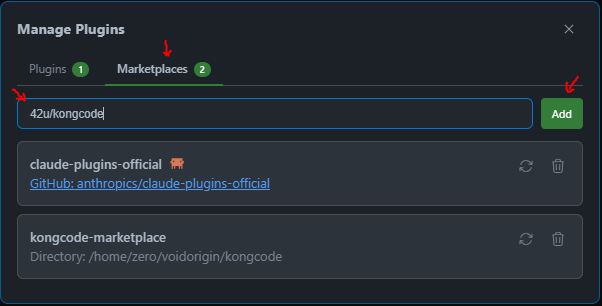
-
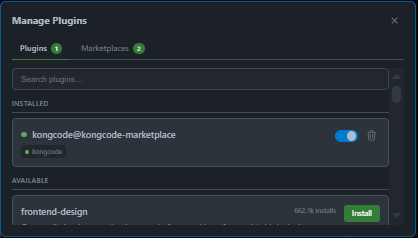
Switch to the Plugins tab
-
Toggle kongcode@kongcode-marketplace on
2. Set up prompts (before launching Claude Code)
KongCode ships two template files that teach Claude how to use the memory graph. Set both up before your first session.
# Find the plugin cache (installed by step 1)
KONGCODE_DIR=$(ls -d ~/.claude/plugins/cache/kongcode-marketplace/kongcode/* 2>/dev/null | head -1)

# Copy the system prompt (appended every session via CLI flag)
cp "$KONGCODE_DIR/templates/kongcode.txt" ~/.kongcode-prompt.txt

# Copy the global CLAUDE.md (loaded automatically by Claude Code in every project)
cp "$KONGCODE_DIR/templates/CLAUDE.md" ~/.claude/CLAUDE.md
Then add a shell alias so every session uses the system prompt automatically:
bash:
echo 'alias claude="claude --append-system-prompt-file ~/.kongcode-prompt.txt"' >> ~/.bashrc
source ~/.bashrc
zsh:
echo 'alias claude="claude --append-system-prompt-file ~/.kongcode-prompt.txt"' >> ~/.zshrc
source ~/.zshrc
VS Code / IDE users: The
--append-system-prompt-fileflag is CLI-only. IDE sessions still get the global~/.claude/CLAUDE.mdautomatically, which covers the core rules. For full prompt coverage, paste the contents ofkongcode.txtinto your IDE's system prompt settings.
Existing
~/.claude/CLAUDE.md: If you already have a global CLAUDE.md, append the kongcode template rather than overwriting:cat "$KONGCODE_DIR/templates/CLAUDE.md" >> ~/.claude/CLAUDE.md
3. First session
claude
On first run the daemon provisions everything it needs (one-time, ~2-3 minutes):
- Downloads the SurrealDB binary for your platform
- Downloads the BGE-M3 GGUF embedding model (~420MB)
- Spawns a managed SurrealDB process at
~/.kongcode/data/
Subsequent sessions start in seconds.
4. Migrate existing memory files (one-time)
If you have existing .md memory files from Claude Code's built-in memory system (~/.claude/projects/*/memory/*.md), migrate them into the graph on your first session:
- Wait for the kongcode healthcheck to be green (the daemon will report status at session start)
- Ask Claude to ingest the old files:
"Ingest all my old memory .md files from
~/.claude/projects/*/memory/into knowledge gems, then archive the originals." - Claude will use
create_knowledge_gemsto import each file, then move the originals to an archive directory - A single
MEMORY.mdwill be left behind pointing to the graph:
# MEMORY POINTS AT KONGCODE

This file-based memory system is deprecated. Memory lives in the kongcode
graph database at ~/.kongcode/data/ (SurrealDB).

Use kongcode MCP tools for memory operations:
- `recall` — search the graph
- `record_finding` — save a decision / preference / correction / fact
- `core_memory` — manage always-loaded directives
- `introspect` — DB health and diagnostics

Do not write new .md files in this directory.
After migration, all future memory operations go through the graph — no more scattered .md files.
Updating
/plugin marketplace update kongcode-marketplace
/plugin update kongcode@kongcode-marketplace
No auto-update. Once you update, the next session picks up the new code automatically. No manual restart needed.
Bring-your-own-SurrealDB (advanced)
If you already run SurrealDB, set SURREAL_URL and the bootstrap skips the managed child:
export SURREAL_URL="ws://localhost:8000/rpc"
export SURREAL_USER=root
export SURREAL_PASS=root
KongCode also auto-detects an existing SurrealDB on 8000, 8042, or the managed port at startup.
Platform support
| Platform | SEA binary | JS fallback (needs Node) |
|---|---|---|
| linux-x64 | yes | yes |
| linux-arm64 | yes | yes |
| macOS-arm64 | yes | yes |
| macOS-x64 | no | yes (Node 18+) |
| win32-x64 | yes | yes |
| Other | no | yes (Node 18+) |
If you hit issues, please file at https://github.com/42U/kongcode/issues.
Architecture
KongCode runs as two cooperating processes:
                    +--------------------------------------------+
                    |  kongcode-daemon (long-lived, 1 per host)  |
                    |  +--------------------------------------+  |
                    |  | SurrealStore (graph DB connection)   |  |
                    |  | EmbeddingService (BGE-M3 in RAM)     |  |
                    |  | ACAN weights + retrain loop          |  |
                    |  | Tool + hook handlers                 |  |
                    |  | Auto-drain scheduler                 |  |
                    |  +--------------------------------------+  |
                    |                       ^                    |
                    |           Unix socket | JSON-RPC 2.0       |
                    |     ~/.kongcode-daemon.sock                |
                    +--------------------+-+--------------------+
                                         |
              +--------------------------+-------------------------+
              |                          |                          |
   +----------+----------+    +----------+----------+    +----------+----------+
   |  kongcode-mcp #1    |    |  kongcode-mcp #2    |    |  headless drainer   |
   |  (Claude Code A)    |    |  (Claude Code B)    |    |  (auto-drain spawn) |
   +---------------------+    +---------------------+    +---------------------+
- kongcode-daemon: Long-lived background process owning the SurrealDB connection, BGE-M3 embedding model, BGE-reranker-v2-m3 cross-encoder, ACAN weights, all tool/hook handlers, and the auto-drain scheduler. Survives plugin updates, MCP restarts, and Claude Code crashes.
- kongcode-mcp: Thin per-session client. Forwards MCP RPC to the daemon over local IPC. Plugin updates only restart this; the daemon keeps running.
ACAN (Attentive Cross-Attention Network) is a learned scoring model that replaces the fixed WMR (Weighted Memory Relevance) heuristic once enough retrieval-outcome data accumulates. It trains on query-memory pairs labeled by actual utilization — whether the retrieved item was referenced, cited, or acted on. Training runs in a worker thread; weights are hot-reloaded across concurrent sessions via a shared JSON file. Before ACAN activates, WMR provides a solid baseline using seven weighted signals: cosine similarity (largest weight), recency, importance, access count, neighbor bonus, proven utility, and reflection boost.
BGE-reranker-v2-m3 is a cross-encoder that rescores the top candidates pairwise against the query after the initial vector + ACAN pass. The two-stage retrieve-then-rerank pipeline is modeled on the design validated at 98.2% R@5 on LongMemEval in the upstream kongclaw project; the eval harness for this number ships separately and is not bundled in this repo.
Multiple Claude Code sessions share one daemon: one BGE-M3 in RAM instead of N copies, one SurrealDB connection pool.
Lifecycle
- Spawn: The first mcp-client to find a missing daemon socket forks one (detached, PID-file-locked so concurrent sessions don't race).
- Idle reap: When no clients are attached for 6s (configurable), the daemon exits to free RAM. The next client spawns a fresh one in 1-2s.
- Supersede on update: When a newer version connects, the old daemon shuts down after all current sessions close. No active work is interrupted.
- Auto-drain: When
pending_workexceeds threshold, the daemon shells out toclaude --agent kongcode:memory-extractor-lite(default; setKONGCODE_AUTO_DRAIN_MODEL=opusfor the heaviermemory-extractorvariant) as a headless subprocess.
Auto-drain & costs
Memory extraction (causal chains, concepts, skills, etc.) needs an LLM. The daemon shells out to your already-authenticated claude CLI to process the queue. This runs under your existing Claude Code authentication and counts toward your normal usage. Each spawn processes roughly 5-15 queued items.
Cadence (default tier; constrained-resource tier is 15 min between sweeps — see src/engine/resource-tier.ts:43,53,63):
- On daemon startup
- Every 5 minutes while the daemon is alive (15 min on constrained tier)
- Once after each session ends (debounced)
Cost gating:
KONGCODE_AUTO_DRAIN_THRESHOLD(default 5): below this queue size, the scheduler is a no-op- PID-file lock prevents overlapping spawns
KONGCODE_AUTO_DRAIN=0disables the scheduler entirely
To disable: export KONGCODE_AUTO_DRAIN=0 in your shell config.
Commands & tools
KongCode exposes slash commands (you type) and MCP tools (the assistant calls them).
| Slash command | What it does |
|---|---|
/recall [query] | Search past knowledge across concepts, memories, turns, artifacts, and skills |
/core-memory [action] | List, add, update, or deactivate always-loaded directives |
/introspect [action] | Database diagnostics: status, count, verify, query, migrate |
/kongcode-status | One-shot health dashboard (counts, embedding coverage, graduation progress) |
The assistant also has access to MCP tools it calls autonomously: recall, core_memory, introspect, memory_health, record_finding, supersede, link_hierarchy, what_is_missing, cluster_scan, create_knowledge_gems, fetch_pending_work, commit_work_results, create_skill, and get_skill_body.
Configuration
All env vars are optional with sensible defaults.
SurrealDB connection
| Variable | Default | Description |
|---|---|---|
SURREAL_URL | ws://localhost:8000/rpc | SurrealDB WebSocket URL. Bootstrap auto-detects 8000, 8042, then the managed port. |
SURREAL_USER | root | SurrealDB username |
SURREAL_PASS | root | SurrealDB password |
SURREAL_NS | kong | SurrealDB namespace |
SURREAL_DB | memory | SurrealDB database |
SURREAL_BIN_PATH | (auto) | Path to surreal binary; bypasses bootstrap download |
Cache & data paths
| Variable | Default | Description |
|---|---|---|
KONGCODE_CACHE_DIR | ~/.kongcode/cache | Where binaries, models, and lock files live |
KONGCODE_DATA_DIR | ~/.kongcode/data | SurrealDB data directory |
EMBED_MODEL_PATH | (auto) | Override path to the BGE-M3 GGUF file |
KONGCODE_SURREAL_PORT | 18765 | Managed SurrealDB child's port |
Bootstrap & daemon lifecycle
| Variable | Default | Description |
|---|---|---|
KONGCODE_SKIP_BOOTSTRAP | 0 | Set 1 to skip first-run provisioning entirely |
KONGCODE_DAEMON_IDLE_TIMEOUT_MS | 6000 | Daemon exits after last client disconnects. Set 0 to disable. |
KONGCODE_DAEMON_TRANSPORT | unix | Set tcp for loopback TCP (Windows) |
KONGCODE_NODE_LLAMA_CPP_PATH | (auto) | Override path to node-llama-cpp install |
KONGCODE_LEGACY_MONOLITH | 0 | Set 1 for pre-0.7.0 single-process mode (emergency rollback) |
GPU selection (multi-GPU, optional)
By default node-llama-cpp uses all available CUDA GPUs. On a multi-GPU box you can pin only the kongcode daemon to specific GPU(s) — without forcing other CUDA apps onto them (e.g. keep a big GPU free). Strictly opt-in: a no-op by default, so single-GPU and CPU-only setups are unaffected.
| Variable | Default | Description |
|---|---|---|
KONGCODE_CUDA_VISIBLE_DEVICES | (unset) | Pins the daemon's CUDA context to the given device(s). Prefer a GPU UUID (GPU-xxxx…, from nvidia-smi -L) over a numeric index — indices depend on CUDA_DEVICE_ORDER. |
Equivalent without env: write the value (one line) to ~/.kongcode/cuda-visible-devices — handy to (re)pin a running daemon without relaunching the client. An already-set CUDA_VISIBLE_DEVICES is left untouched (operator wins). The daemon also sets CUDA_DEVICE_ORDER=PCI_BUS_ID so device indices match nvidia-smi. Restart the daemon to apply (kill it; the next call respawns it).
Auto-drain
| Variable | Default | Description |
|---|---|---|
KONGCODE_AUTO_DRAIN | 1 | Set 0 to disable the auto-drain scheduler |
KONGCODE_AUTO_DRAIN_THRESHOLD | 5 | Min queue size before scheduler spawns an extractor |
KONGCODE_AUTO_DRAIN_INTERVAL_MS | 300000 | Periodic check cadence (5 min) |
KONGCODE_CLAUDE_BIN | (auto) | Explicit path to the claude binary |
Logging
| Variable | Default | Description |
|---|---|---|
KONGCODE_LOG_LEVEL | warn | One of error, warn, info, debug |
How it works
Every turn
Before each prompt, KongCode runs a multi-stage retrieval pipeline to surface the most relevant prior knowledge:
- Vector search — BGE-M3 embeds the prompt and retrieves candidates by cosine similarity from concepts, memories, turns, artifacts, and skills
- WMR/ACAN scoring — a 7-signal Weighted Memory Relevance score (cosine similarity, recency, importance, access frequency, neighbor bonus, proven utility, reflection boost) is computed per candidate. When enough retrieval-outcome data has accumulated (5000+ labeled pairs), the learned ACAN (Attentive Cross-Attention Network) weights replace the fixed WMR weights automatically
- Cross-encoder rerank — the top candidates are rescored pairwise against the query using a BGE-reranker-v2-m3 cross-encoder (~606 MB GGUF, loaded lazily on first retrieval). The two-stage retrieve-then-rerank design is modeled on the upstream kongclaw project, which measured 98.2% R@5 on LongMemEval; the eval harness is not bundled in this repo. Falls back to WMR/ACAN-only when the model isn't available
- Graph expansion — each top-scored node's graph neighbors (broader/narrower/related_to edges, causal chains, skill links) are pulled in
- Dedup + budget trim — duplicates are collapsed and the final set is trimmed to fit the context budget
- Format + inject — results are assembled into
<recalled_memory>blocks and injected into the conversation
Tool calls and their outcomes are tracked. After the assistant responds, the turn is ingested and trailing work is queued.
Between sessions
When a session ends, KongCode queues extraction work (concepts, causal chains, skills, etc.). The auto-drain scheduler processes these in the background. A cleanup pass on the next session start handles orphaned sessions (e.g. terminals closed without a clean shutdown).
Soul graduation
After roughly 15 sessions with sufficient quality signals (reflections, completed causal chains, a healthy concept graph, and accumulated skills), the agent earns a soul: an emergent identity document with working style, self-observations, and evidence-grounded values. Once graduated, the soul is loaded into every turn, giving continuity across sessions without retraining.
Troubleshooting
"Failed to reconnect to plugin:kongcode"
The mcp-client failed to start. Common causes:
- Node not on PATH (Windows post-winget install): restart your terminal AND Claude Code
- Daemon binary corrupted:
rm -rf ~/.kongcode/cache && claudewill re-bootstrap - Port conflict: another process is on 18765. Set
KONGCODE_SURREAL_PORTto a free port.
Check the daemon log: tail -100 ~/.kongcode/cache/daemon.log
Daemon won't recycle to new version
Other sessions or background extractors may still be attached. The daemon waits for ALL clients to disconnect before honoring the supersede flag.
To force-recycle: kill -TERM $(cat ~/.kongcode/cache/daemon.pid). The next session will spawn a fresh daemon.
Auto-drain isn't running
Verify auto-drain is not disabled: echo $KONGCODE_AUTO_DRAIN (if it prints "0", that's why).
Check if a lock is held: cat ~/.kongcode/cache/auto-drain.pid
Check if the claude binary is findable: which claude
If the binary isn't on PATH, set KONGCODE_CLAUDE_BIN=/path/to/claude and restart Claude Code.
Pending_work queue keeps growing
Each session end queues a few work items. If the queue is growing faster than draining:
- Check daemon log:
grep auto-drain ~/.kongcode/cache/daemon.log - Lower the threshold:
KONGCODE_AUTO_DRAIN_THRESHOLD=1 - Manually trigger a drain via
/kongcode-statusor by spawning akongcode:memory-extractorsubagent
Files & paths to know
| Path | Purpose |
|---|---|
~/.kongcode/cache/daemon.pid | PID of the running daemon |
~/.kongcode/cache/daemon.log | Daemon stdout/stderr |
~/.kongcode/cache/daemon.spawn.lock | Held during daemon spawn |
~/.kongcode/cache/auto-drain.pid | Held while a headless extractor is running |
~/.kongcode/cache/surreal.pid | Managed SurrealDB child's PID |
~/.kongcode-daemon.sock | Daemon's IPC listening socket |
~/.kongcode/data/ | SurrealDB data files |
~/.kongcode/cache/models/ | Downloaded GGUF embedding model |
Skill suite
KongCode ships skills that auto-activate on matching user prompts. Each lives in skills/<name>/SKILL.md.
Foundation:
kongcode-health: Pre-flight check before graph writesground-on-memory: Enforce grounding discipline (scan context, cite items, note gaps)
Intelligence:
recall-explain: Cluster recall output, flag contradictions, produce evidence summariescapture-insight: Foreground knowledge capture without waiting for the batch daemon
Write-time quality:
supersede-stale: Realtime supersession of outdated conceptsextract-knowledge: Source-agnostic extraction (PDF, code, URL, doc, transcript) with cross-source linking
Compound value:
synthesize-sources: Multi-source meta-concept generation with cross-link edgesknowledge-gap-scan: Topic coverage analysis before researchaudit-drift: Periodic sweep for stale knowledge
Source-specific extraction:
extract-pdf-gems: PDF-specific knowledge gem extraction (predecessor to source-agnosticextract-knowledge)
Identity & introspection:
kongbrain: Identity-grounded interaction patterns (search memory, recall, soul management)
Backup & release:
kongcode-backup-native: Lossless SurrealDB-to-SurrealDB snapshotkongcode-backup-jsonl: JSONL export for ingestion into non-SurrealDB systems (Postgres + pgvector, Neo4j, etc.)kongcode-backup-semantic: Knowledge-core-only transfer to peer agents (concepts/memories/skills, no transcript volume)kongcode-release: End-to-end version-bump workflow across all 6 release surfaces
Full workflow docs: docs/WORKFLOWS.md.
Development
npm run build
npm run dev
npm run typecheck
npm test
The dist/ directory ships in releases (intentionally not gitignored). Contributors should npm run build before testing.
A pre-push hook gates pushes on the full vitest suite. The hook is per-clone (git's .git/hooks/ is not tracked in the repo) — install it with cp scripts/pre-push-hook.sh .git/hooks/pre-push && chmod +x .git/hooks/pre-push after cloning. The suite includes a schema-edge integrity guard that checks every store.relate() call against the IN/OUT types declared in schema.surql, plus D1-D4 structural lints (v0.7.94) that prevent regression of the append-only / backfill-coverage / cosine-identity-guard / no-DELETE-on-content-tables invariants.
MIT License | Built by 42U | VoidOrigin